Couple of days ago I had to create a content pager which can dynamically insert page numbers including previous and next buttons.
The reason why I had to use Javascript and not any server side solution is quite interesting – the paging method should not really divide the content into different web pages. This is needed because if the text we want to split contains any XHTML markup and we divide it into separate web pages the markup will be broken (invalid). Just imagine having opening tag in the first page and closing in the second – not cool! Other break point is if we just split some tag in two.
Using my favourite Javascript Framework – Mootools and with couple of XHTML/CSS tricks I could get it working with the following code:
var pagerPageHeight = $('warper').getSize().y;
var contentArea = $('content');
var pagerCurPage = 1;
var pagerPagesCount = 1;
var pagerPages = $('pager');
var pagerInit = function(){
var contentHeight = contentArea.getSize().y ;
pagerPagesCount = (contentHeight / pagerPageHeight).toInt();
if (contentHeight % pagerPageHeight != 0 ) pagerPagesCount++;
if (pagerPagesCount === 1) return;
var prev = new Element('a', {
'class': 'cust-pager-prev',
'html': '<',
'id': 'cust-pager-prev',
'events': {
'click': function(){
pagerChangePage(pagerCurPage - 1);
}
}
});
var next = new Element('a', {
'class': 'cust-pager-next',
'html': '>',
'id': 'cust-pager-next',
'events': {
'click': function(){
pagerChangePage(pagerCurPage + 1);
}
}
});
prev.inject(pagerPages,'top');
$('cust-pager-prev').setStyle('display','none');
for (var i=1; i<=pagerPagesCount; i++){
var anchor = new Element('a', {
'class': 'cust-pager-item',
'id': 'cust-pager-item-'+ i,
'html': i,
'events': {
'click': pagerChangePage.pass(i)
}
});
anchor.inject(pagerPages);
}
next.inject(pagerPages,'bottom');
};
var pagerChangePage = function(page){
$('cust-pager-item-' + pagerCurPage).set('class', 'cust-pager-item');
$('cust-pager-item-' + page).set('class', 'cust-pager-item-sel');
pagerCurPage = page;
if (pagerCurPage === 1) {
$('cust-pager-prev').setStyle('display', 'none');
}else{
$('cust-pager-prev').setStyle('display', 'inline');
}
if (pagerCurPage === pagerPagesCount) {
$('cust-pager-next').setStyle('display', 'none');
}else{
$('cust-pager-next').setStyle('display', 'inline');
}
contentArea.setStyle('top', (-1) * pagerPageHeight * (page - 1));
};
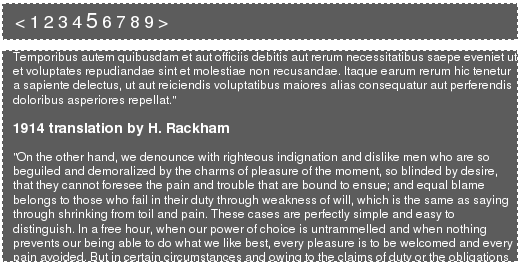
pagerInit();The example and the picture as usual.
Comments
Comment by Vesko Kolev on 2008-08-17 21:23:54 +0300
Great idea!
Comment by Peter on 2008-08-18 21:28:09 +0300
Thanks – Haven’t figured it all by myself ;)
Comment by bhaarathiya on 2008-12-30 16:16:24 +0300
It is not working when i used ..please tel me how to use this
Comment by Peter on 2009-01-02 23:13:16 +0300
refer to the example
Comment by mehul shah on 2009-02-02 10:36:22 +0300
its not working please tell me how to use this paging
please its urgent
please tell on this mail address…..
Comment by Peter on 2009-02-02 11:28:09 +0300
Did you checked the example? It is quite simple
Comment by doubleop on 2009-02-19 20:45:25 +0300
hi, im having problem, pager does not appear it ends on something like check screenshot http://img142.imageshack.us/my.php?image=51917501da6.jpg
any ideas ? thanks…

Comment by damien on 2009-03-20 01:48:02 +0300
Beautiful, works like a charm…
it’s a great job…since it’s open to customization :)
thanks for the code !
Comment by pardi on 2009-04-22 13:12:41 +0300
its not fully working in chrome browser..?
Comment by Peter on 2009-04-22 13:43:55 +0300
@pardi – Haven’t tested, maybe mootools has some problem with chrome. Will check it soon.
Comment by will on 2009-06-09 12:43:22 +0300
This script is very handy, thanks
Just want to mention your code above contains escaped characters
i.e. < instead of <
Comment by Paul on 2009-06-15 15:15:51 +0300
@Peter
Great script, I’m going to use it :) One note – you should use ‘visible: none’ instead of ‘display: hidden’ for ” symbols since using second one causes whole pager to change it’s position after user clicks on it.
Comment by Peter on 2009-06-15 15:21:08 +0300
@ Paul – I guess you are refering to visible:hidden instead of display:none, but yeah it makes sense
Comment by Ute on 2009-11-25 14:28:52 +0300
Great job, thanks a lot!
Comment by Darby on 2009-12-10 06:22:43 +0300
Loved it. It would be awesome if you can have a scrollbar within the content section as well. Is this possible?
Comment by Peter on 2009-12-10 12:12:13 +0300
@Darby – It should be, play with the overflow property of the container
Comment by Petr Hrudka on 2010-08-07 20:00:48 +0300
Great piece of code, it exactly matches what I need :)
Thanks!
P.
Comment by vaibhav on 2010-08-26 10:28:58 +0300
Nice but one drawback words split between pages in bottom and start point.
anyways thanks for sharing ur script.
Comment by Aloy on 2010-09-08 16:16:08 +0300
Nice script. In each of the pages i need it to show say ‘page 1 of 50’ then few proceeding page numbers, then previous and next. If my page will come to 70 pages using the script, i need to make the paging and numbers appear nice. Any help on this?
Comment by Al J on 2010-10-04 15:51:49 +0300
Very nice script!
Any thoughts on how to prevent the text beeing cut at the bottom, and top of the page?
Comment by Jmm on 2010-11-20 20:16:09 +0300
Can anyone provide me with the second page of the code. Completely new to javascript.
Comment by James on 2011-04-06 21:28:13 +0300
Why do you need javascript to do this? Why not just set anchors, add a fixed height to the content div and hide the overflow? Pure HTML and CSS, looks exactly the same, and no need for JS or MooTools…very simple, same effect.
Comment by Pritesh on 2013-02-08 12:59:24 +0300
Very Useful script for pagination