Web Accessibility is important aspect of the modern websites and including functionality for increasing / decreasing the font-size of the body text is a good step for achieving it. With all recent A grade browsers this is kind of unneeded since they have build in zoom functionality (ctrl + / ctrl -) but still there are couple of advantages for using custom solution:
- Preventing broken design due to resizing displacements
- Easier for less experienced users who don’t know how to zoom from the browser
- Looks kind of cool :)
The script I’ve written has the following features:
- Stores settings (increase/decrease value) in cookie
- Uses style switching (overwriting) so there is no font resizing after page load
- Limits the resizing to three steps in each way
Here is the code and example. Note that I’m changing only the body font-size because all paragraphs are using relative units (em). If you prefer to use absolute units (px) you will need to declare all CSS selectors you are using.
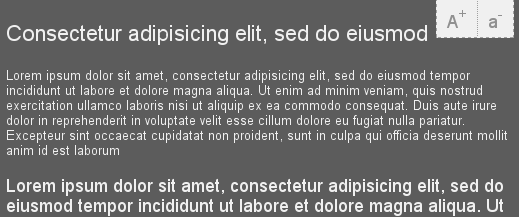
Of course there are couple of things which can be improved but I wanted a simple script working under all major browsers : IE 6+, FF, Opera, Safari.
Comments
Comment by Todd on 2009-02-07 19:10:25 +0300
Heya, this is really cool, can you lend a guy a hand on how to implement this into my website?
Comment by Peter on 2009-02-07 19:26:45 +0300
sure drop me a line (mail, skype, whatever)
Comment by Erin on 2009-02-20 01:25:30 +0300
Great script, Peter! Just having one small issue while integrating this into my site with it defaulting to the largest size?
Comment by Peter on 2009-02-21 03:09:29 +0300
it stores the last value in cookie, delete your cookie and check again
Comment by Nuria on 2009-03-12 11:11:15 +0300
Thanks for this script.
Comment by Aby P Rajan on 2009-03-27 07:36:30 +0300
Hi, I was searching for this for a long. Would you please mail me the script and how to add this to a website. Thanks in advance.
Comment by Peter on 2009-03-27 19:52:21 +0300
@Aby check the example – it is all there
Comment by Adrian Kalbarczyk on 2009-03-31 20:59:11 +0300
As a visual impaired person, I don’t like an idea of increase/decrease font size. I never used the buttons “+” and “-“. There are much better options available – most of them are external to browser. In Linux there is a screen magnifier derived as plug-in for Compiz available just after installation. I use it on the daily basis. For Windows there are (crappy and expensive but still…) other magnification options and screen readers, which could read text that we point on (it’s especially good when eyes are tired).
There also internal good solutions for resizing fonts with layout (I think it works only on FF) described somewhere on yahoo – it doesn’t need JS. As far as there are better solutions for disabled peoples we, programmers, don’t need to do extra work writing code you posted here. However it’s extremely important to tell disabled people that there are these solutions and teach how to use them. As far as I’m concerned you are from Bulgaria, and there are problems with money for specialized computer systems for disabled people. In that case you should take this into your own hands and spread a word about abilities of free Linux. I’m sure this is valuable activity.
Feel free to contact me if you have any questions. I have big experience in the field of researching web usability for disabled people, and own experience as one of disabled web programmers.
Comment by Stephen on 2009-04-10 15:23:43 +0300
Hey man i have been trying to use ur javascript font size script in my cms made simple content management site.
I have created a seperate javascript file here
http://www.armaghruraltransport.co.uk/dynamic-font-resize.js
i have placed this code into the content area div on my index page.
A+ a-
i have attached the javascript link to the template here
{stylesheet}
{* This is how all the stylesheets attached to this template are linked to *}
but nothing seems to be happening, can you see any reason why?
Comment by Peter on 2009-04-10 15:38:20 +0300
you have forgotten the id of your body tag, currently in the JS it is named #your-body
Comment by stephen on 2009-04-13 23:14:46 +0300
cool man cheers :)
Comment by Black Max on 2009-04-25 16:57:31 +0300
Hi Peter,
Nice script, both modifiable and unobtrusive. I like it and am trying to work it into my current design. However, I keep running into a small problem. When I rename the body ID from “your-body” to anything else, the script does not function. I’m making the changes in the CSS, the HTML, and this line in the JS:
#your-body {font-size:’ + (10+x) +’px;}\
I would think I could rename it anything I wanted to, i.e.
#foo {font-size:’ + (10+x) +’px;}\
as long as I made the corresponding changes in the CSS here:
#foo{
and in the HTML here:
(Sorry to be pedantic, but I want to make sure I’m saying everything straight.)
Any thoughts? Thanks, Peter.
Comment by Peter on 2009-04-25 19:03:20 +0300
@Black Max – it should be working, at least I don’t see a reason why. Can you put the code somewhere so I can give it a look?
Comment by Black Max on 2009-04-26 00:38:23 +0300
Peter, now it seems to work, at least in a demo page. Go figure. :) Maybe it was a cookie or cache issue…?
Comment by Mithra on 2009-06-04 08:54:08 +0300
It will be good if the code gets uniformly re-sized. If the syle code is applied to the parent tags like div’s etc, instead of p tags it would be great. There is id=”decrease” defined in the , however the syle definition for the same is missing, oe am i missing something?. Then it would have been great. Also a Reset option will be very very useful. However the script is great thanks.
Comment by Peter on 2009-06-04 09:46:24 +0300
Generally it is best to use relative size fonts (em, %) this way you can adjust only the size of the body tag. The decrease id is not used (i think) and reset option is easy to implement, just store the initial value in some var.
Comment by emre on 2009-07-01 14:25:04 +0300
good job peter thanks for the code.
I’m using it.
but I’m also interested in Adrian Kalbarczyk comment.
I think I will google it in my spare time.
I wanna ask you something if it’s ok with you.
In realized your web site identifies that I’m using adblock how can you do that?
Can you show us how to do that?
And after that I won’t use adblock plus in your site and I will happily click your ads.
Thanks in advance
Comment by Peter on 2009-07-01 14:50:13 +0300
@emre – For the ads basicly i check the size of the iframe. Here is the code:
if ($$(“.google-sense468”)[0] && $$(“.google-sense468”)[0].clientHeight == 0 && $(‘block-warning’)) $(‘block-warning’).setStyle(‘display’,’block’);
Comment by Apparatus on 2009-10-27 14:47:56 +0300
Hi,
Nice script, works very well!
What if I want to use the same script at two or more places? For example at #your-body and #your-body2 etc.
So how should I add #your-body2 at the code?
Comment by Peter on 2009-10-29 12:51:08 +0300
@Apparatus – if you use relative font sizing all fonts on your page will resize
Comment by sangeetha on 2009-11-23 09:56:51 +0300
Nice code
i want the code something like which has radio buttons having options like small, larger, largest, medium
and when user clicks on radio button and apply the changes must get applied
Plz can u help me out
Comment by Peter on 2009-11-23 12:23:58 +0300
@sangeetha – well create three radio buttons and attach click/selected events to them, then call the increase/decrease function
Comment by Cloud on 2010-01-02 10:17:53 +0300
Friend, where should I paste into?
my Blog XHTML?
please teach me, thanks.
Comment by Yasin on 2010-01-13 22:50:51 +0300
Hi., Peter Nice work., It works fine., ..,
——–
i had gone thru all u r post…..
I had a question..,
Similar to this work., is it possible to change the background color(not only the color., but also font color as per the bgcolor ets) as per the user choice… it similar to theme creation’s… Do u have any idea doing this in css & javasript….
Comment by Peter on 2010-01-15 01:18:48 +0300
@Yasin – Best is to replace the whole css, there are examples, google it
Comment by Darko on 2010-01-15 22:39:46 +0300
Hi, Peter great work ;)
Thanks for the great script.
I was able to integrate in HTML code, but I have a problem that certain elements do not work in IE.
Is there a solution to this problem??
Thanks in advance.
Comment by oko on 2010-01-22 21:11:55 +0300
Usefull tutorial, thx
Comment by Bill on 2010-01-29 16:50:56 +0300
Peter,
This is certainly the best font resizer I have seen. How can it be changed to apply only to a with a specified id instead of the entire ?
Thanks
Comment by Bill on 2010-01-29 16:52:26 +0300
Peter – resending. My div and body words did not appear in the original text
This is certainly the best font resizer I have seen. How can it be changed to apply only to a div with a specified id instead of the entire body?
Thanks
Comment by Laura on 2010-03-26 17:08:19 +0300
Works like a charm – and easy customisable, even for a JS rookie like me. Thanks!
Comment by khadeer on 2010-07-19 07:44:14 +0300
can u tell how to use this code in our website
Comment by Andy on 2010-08-16 16:43:24 +0300
We have implemented your javascript and given the body an id of “school”. I have altered the style accordingly, yet the buttons seem not to make a difference. Can you advise ?
thanks !
Andy
Comment by John Tom on 2010-09-27 18:22:37 +0300
Hi,
Thanks so much for this article. I guess I am one of those hundreds searching for something like this.
I use macromedia dreamweaver in developing my sites. Can you mail me an example of how i can incorporate this in a web page? Will be glad if I can get it.
Regards
Comment by Janet on 2011-03-04 05:11:54 +0300
Thanks for your great script. It works like a charm, wondering whether you can add another function to return to default size.
regards
Comment by Erin on 2011-03-05 00:48:39 +0300
Thanks again for this great font-resize tool. I used it a few years ago and am now implementing it again. The darn cookie issue is really messing with me again, though. Is there a way to remove it from the javascript or at least have it not remember the largest size? It’s really throwing me (and the client) for a loop to continually erase our cookies during this testing phase.
Comment by Indra Chakrabarty,Richmond, BC Canada on 2011-04-11 00:39:07 +0300
I was interested to know how to incorporate your code , like where, and how of it. Please let us know. Where to find the info on how to put it in my firefox browser
Comment by Vertex on 2011-04-16 13:28:46 +0300
Thanks for your great script.
Comment by Antonio on 2012-01-15 15:08:28 +0300
Thanks for a great script! I have a question, the script does not erase the memory in Internet Explorer 9. Open your example by increasing the IE9 IE9 letter close and reopen, it will be the size that you left. Do you have any idea to solve this error? Thanks again and sorry for my bad English.
Comment by Peter on 2012-01-21 13:46:16 +0300
@Antonio – uncomment eraseCookie function call
Comment by Puja on 2012-03-08 13:09:55 +0300
Do you have some script for dynamically displaying content on click of a button?
Thanks
Comment by Neha Khetan on 2013-05-30 13:33:50 +0300
Hi,
My site contains many elements like textbox,dropdown.
CSS file contains many classes like
.clsMainMenu
{
FONT-FAMILY: Arial;
FONT-SIZE: 16pt;
font-weight: bold;
color: #FFFFFF
}
.clsThrdMenu
{
FONT-FAMILY: Verdana;
FONT-SIZE: 13pt;
font-weight: bold;
color: #FFFFFF
}
I want to increase the font size of each elements on the clicking A+ image.Can you provide any solution.
Thanks.